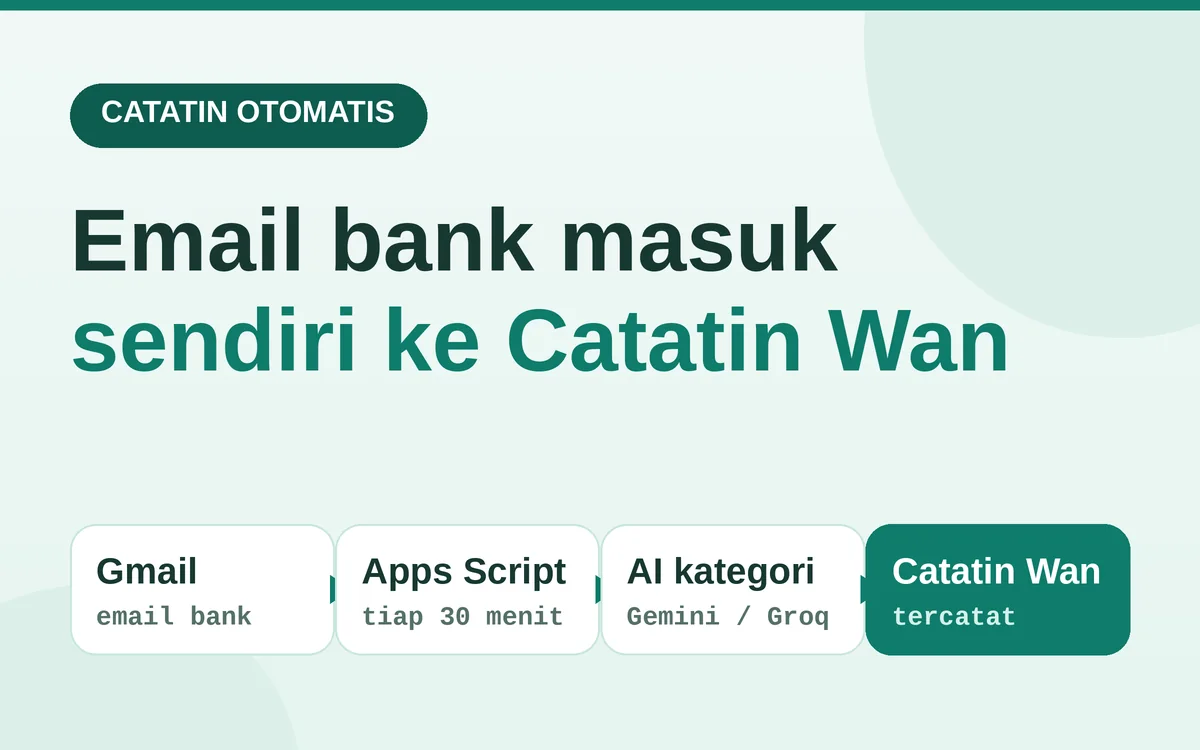
The Problem Was Never Laziness, It Was Friction
Catatin Wan started because I was tired of recapping expenses into a spreadsheet. Once the app existed, logging got much easier: categories, wallets, and AI that can read a chat message or a receipt photo. But over time I noticed one step that never went away: I still had to remember to log.
Almost every transaction from a digital bank already leaves a tidy trace in Gmail: amount, merchant name, and time. The data was already there. What was missing was a bridge from the inbox to the app. That bridge became Catatin Otomatis.
What Is Catatin Otomatis?
Catatin Otomatis is a Google Apps Script you install in your own Google account. It reads transaction notifications in Gmail, extracts the amount and merchant, guesses the category, and logs it to Catatin Wan through the AI Connector (MCP). You just review the results.
- Free, and it runs in your own Google account with no extra server.
- It only reads emails labeled
transaksi. Every other email is left alone. - Setup takes about 15 to 20 minutes with the full setup guide (written in Indonesian).
The Journey of One Email, from Inbox to Logged
Here is what happens when I pay for something with my digital bank:
- The bank sends a notification email. A Gmail filter automatically applies the label
transaksi. - An Apps Script time trigger runs a scan every 30 minutes (configurable to 1, 5, 10, 15, 30, or 60 minutes), and only between 06:00 and midnight Jakarta time.
- The script picks up messages it has not processed yet. The marker is the message ID, stored in a Log sheet.
- A parser reads the subject ("paid to ...", "made a transfer", "received ...") and extracts the amount and merchant.
- The category is decided in layers, from the most certain rule down to AI (explained below).
- If it is confident, the transaction is logged to Catatin Wan. If not, it goes to a Review queue with a reason and a suggested category.
- A summary email tells me how many were logged automatically and how many need a look.
Insight 1: Don't Ask AI to Do What a Rule Can Do
The biggest temptation was to hand everything to AI. I did the opposite: AI is the last layer, not the first. The order is:
- Personal rules in a Rules sheet (keyword to category). If the merchant contains "baso", the category is settled.
- Strong patterns taken from my own history, such as an oil change automatically becoming Motorbike service.
- AI for whatever is left, in one batched call for all new transactions rather than one call per transaction.
- Fallback keywords when AI cannot be reached.
The reasons are practical. Rules are fast, free, and always give the same answer. Free Gemini and Groq quotas are limited, so every call avoided is extra breathing room. And predictable results are more reassuring than results that are "usually right".
The AI itself has three guardrails. First, it can only choose from the real category list in Catatin Wan, and its answer is validated again, so no invented categories slip through. Second, it is shown examples from my own history so it imitates my habits instead of generic ones. Third, merchant names and email text are treated as data, not instructions. Email comes from outside, so its content cannot be trusted blindly.
Insight 2: Good Automation Knows When to Ask
The AI returns a confidence score between 0 and 1. At 0.8 or above, the transaction is logged straight away. Below that, it lands in the Review queue with a note like "AI suggestion: Transport (72%)". The threshold is adjustable, and auto-logging can be switched off entirely if you want everything to pass through manual approval.
Some cases are deliberately never automatic, whatever the AI says:
- Transfers, because the destination and category cannot be guessed from the email.
- Ambiguous amounts, for example an email with several different numbers and no clear label.
- Unrecognized email formats, so that a format change by the bank does not quietly produce wrong records.
One small detail I like: eating at the same place is usually Food & Drinks, but if the transaction note says "nge-date" (Indonesian slang for going on a date), the category automatically becomes Nge-date. Personal rules like this are what make a system feel like yours rather than a generic tool.
And whenever I correct something in the queue, I can mark it "remember as a rule". One correction today means one fewer question tomorrow. No model training, nothing fancy, yet the system learns my habits.
Insight 3: The Slipperiest Bug Came from an Assumption About Gmail
This is the part that made me shake my head. Gmail groups emails with the same subject, for example "You paid Gacoan", into one thread, and labels are applied per thread, not per email. If the script only reads threads that have no label yet, a second purchase at the same merchant is never read, because the thread has carried the label since the first purchase.
The fix was to split the work into two sets: new threads (read every message not yet in the Log) and older labeled threads (read only messages that arrived after the last processed one). The uniqueness marker is the message ID, not the thread ID and not the email content, because two Rp25,000 purchases at the same place in one day are two legitimate transactions.
Insight 4: Small Spreadsheet Details That Can Bite
All history lives in a Google Spreadsheet you own (Log, Activity, and Rules sheets). It sounds trivial, but Sheets "helps" in risky ways:
- An email ID made only of digits gets turned into a number, then can no longer be matched.
- A text like "2026-11-06" is read as a date and can shift by a day because of time zones.
- Text from an email starting with "=" runs as a formula. That is a small security hole if email content is not sanitized.
So every column is written as text, formula-like prefixes are stripped, and the spreadsheet time zone is pinned to Jakarta time. One more thing: the "delete" button only marks a row as deleted instead of removing it. If the row truly disappeared, its email ID would disappear too, and the next scan would read that email again and log it twice.
Insight 5: A Single AI Is Fragile, So Have a Backup
Free APIs have daily quotas and occasional outages. That is why the script supports two providers, Gemini and Groq, and automatically switches to the other when one runs out of quota or errors. There is a short cooldown after a failure (about 5 minutes when the quota is exhausted, 1 minute for server trouble) so the script does not keep hammering a provider that is down. Each provider also has an ordered list of models, so if one is retired it moves on to the next.
Most important: if every AI is down, the system does not stop. Rules and patterns keep working, the rest waits in the Review queue, and on the next scan the script retries the pending ones (up to 10 at a time, from the last 3 days). You do not have to press anything.
Insight 6: Upstream Must Know Downstream's Limits
Catatin Wan refuses connector writes for categories that also change debt, receivable, investment or goal balances. Those must be logged through the app. If that list were offered to the AI, those transactions would get stuck in the queue with the same error forever. So the special categories are filtered out before the AI ever sees the list.
The same thinking applies to concurrency. The automatic scan, the "Check email now" button, and two devices can run almost simultaneously, so the write path is protected by a lock (LockService) to keep a transaction from being logged twice. Every change made through the connector is also recorded in a history, so if something looks wrong I can see what changed and undo it.
Security and Privacy: What Actually Happens
This part matters, so it deserves more than a skim.
- The script runs in your Google account. Your email, spreadsheet, and API keys do not pass through Catatin Wan servers.
- The Gmail permission it asks for can read and label messages, but the script only processes emails labeled
transaksi. - The script logs to Catatin Wan with a personal token. The server only stores its fingerprint, and you can revoke the token at any time.
- The Web App is deployed with "Anyone" access because Catatin Wan calls it from another domain. What protects it is not a secret URL but a server-side check: each request carries the Catatin Wan account sign-in, verified with Google, and only an allowed UID is accepted.
- If you add a Gemini or Groq API key, the transaction text that needs a category guess is sent to that provider and is subject to their policies.
What It Can't Do (Yet)
To set the right expectations:
- It is not real time. The delay equals the scan interval, 30 minutes by default.
- It only reads email. Cash spending, or anything that sends no notification, is still logged manually.
- By default only today's emails are scanned, and you can widen that to include yesterday.
- If a bank changes its email format, nothing is lost. The transactions simply move to the Review queue until the parser is adjusted.
- Free Apps Script and AI API quotas have limits. For personal use they are usually enough, but they are not unlimited.
What I'm Taking Away
- Remove friction, don't add features. The best feature in a finance app is the one that means you never have to open it.
- AI is the last layer. Simple, predictable rules beat a big model for most cases and make the rest cheaper.
- Build the way back from day one. The Review queue, delete-as-mark, and change history are what made me comfortable switching on automatic mode.
- Treat every outside input as untrusted. Emails, merchant names, even date formats can mislead you.
- Clean data beats clever tools. It is also a principle I hold in Local SEO: consistent, tidy information is worth more than any trick layered on top.
Want to Try It?
All the steps are in the Catatin Otomatis setup guide (in Indonesian). Get these ready first: a Catatin Wan account with Cloud Sync on, a personal token from the AI Connector (MCP) menu, a Gmail account that receives your bank notifications, and, if you want automatic categories, a free Gemini or Groq API key.
My advice: start with a single bank, then watch the Review tab for a few days. That is where you "teach" the system through rules, and after that it barely asks anything.
I am still improving it bit by bit. If you find a bug or have an idea, tell me at catatinwan@gmail.com.